Map
North is up. The grey rose is the VOR. Drag the aircraft. The dashed line is the OBS course through the station — radial and reciprocal.
VOR trainer
Read the guide, load an example, then fly it. OBS, CDI, TO/FROM, DME, and the NAV flag. This is not a certified NAV receiver.
How to use it
North is up. The grey rose is the VOR. Drag the aircraft. The dashed line is the OBS course through the station — radial and reciprocal.
Omni Bearing Selector. This rotates the course card, like the OBS knob on a real CDI. It does not turn the aeroplane.
Where the nose is pointed. Set this, then tap Fly heading. The aircraft moves at the TAS you typed.
Radial = your magnetic bearing FROM the station. DME = distance. CDI = needle (L/R degrees). Flag = TO, FROM, or NAV.
Trainer
Load an example from the buttons under the instrument, or start a drill. Each lesson below tells you which button to tap.
Drag the aircraft. North is up. The orange line is the OBS course through the station.
OBS
360
Heading
180
Radial
037
DME
10.0 NM
CDI
R 12.0°
Flag
FROM
Reverse sensing. Your heading is more than 90° from the course the flag is offering. Fly toward the needle and you will leave it.
Examples
Load a picture, then read the matching lesson in the guide below.
Drills
Each dot is 2°. Full-scale is 10°. Radials radiate FROM the station. The dashed line on the map is the OBS course and its reciprocal. Over the station the cone of confusion throws the NAV flag — do not chase the needle there. Training aid only. Legal.
Training guide
Work them in order the first time. After that, skip to the one you fail in the air.
01
A VOR is a ground station that paints 360 radials — magnetic tracks radiating FROM the station. You are always on one of them, unless you are in the cone directly overhead.
The instrument in the cockpit does not know your heading. It only knows where you sit relative to the station, and what course you dialled on the OBS. That is why reverse sensing exists: the needle is about position, not about the nose.
On this trainer the station is the grey disc. You are the chevron. DME is the range in nautical miles.
Practise. Look at the map. Do not touch OBS yet. Drag the aircraft around the rose and watch Radial and DME change. Heading can stay where it is.
02
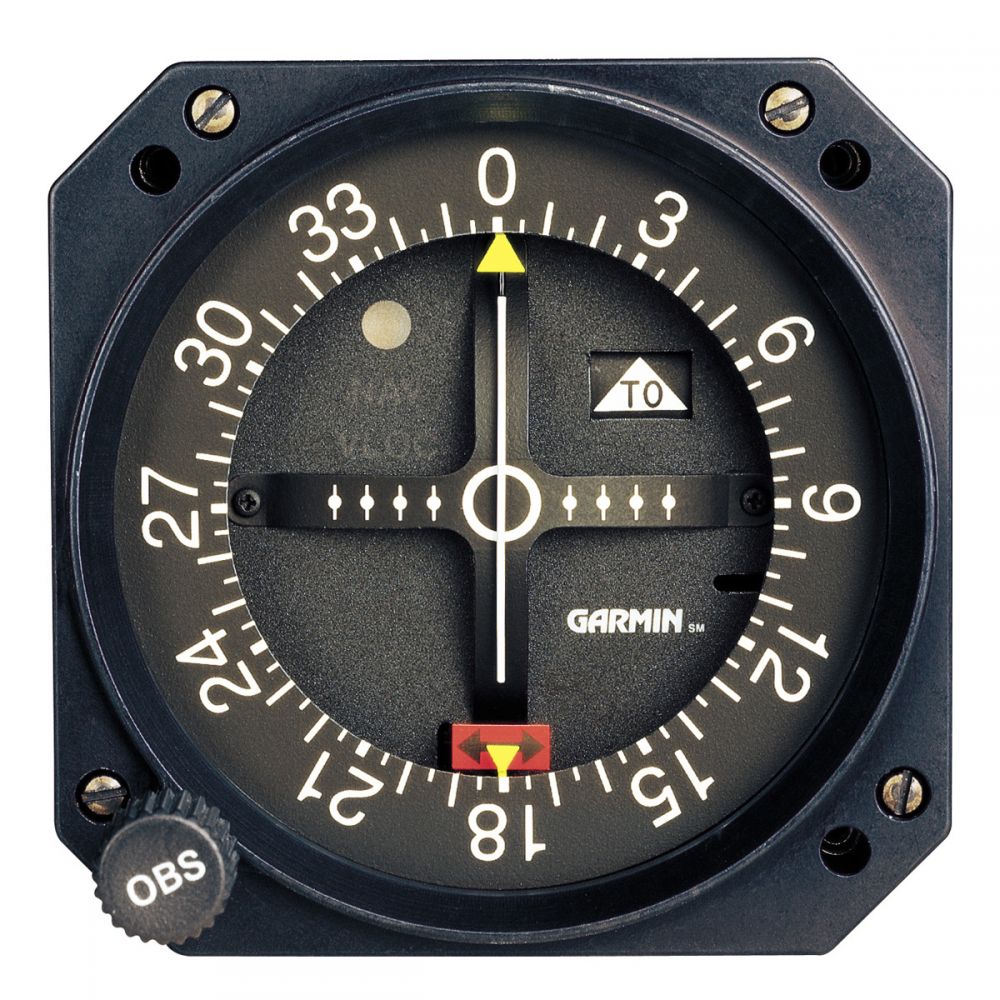
OBS — the number at the top of the card is the course you have selected. Rotate it with +1 / +10 or the slider. Same job as the OBS knob on a Garmin CDI.
CDI needle — each dot is 2°. Five dots is full-scale, 10°. Needle right means you are to the right of the selected course (when you are not reverse-sensing). Centre means you are on the course line: that radial or its reciprocal.
TO / FROM — FROM means you are on the selected-radial side of the station. TO means you are on the reciprocal side, so flying the OBS course would take you to the station. NAV means the signal is unusable: overhead (cone of confusion) or out of range.
Practise. Tap FROM, on course under Examples. Needle centred, FROM, radial 360, DME about 10 NM. Then tap Needle right. The needle walks right; you did not change heading.
03
If you are north of the station you are on the 360 radial. East is 090. South is 180. West is 270. The number is the magnetic direction from the station to you — not from you to the station.
To go TO the station along the 360 course you must be south of it, on the 180 radial, with OBS 360 and a TO flag, heading 360.
Students mix this up in the oral because the number on the OBS looks like a heading. It is a course. Set heading separately.
Practise. Tap TO, inbound. You are south of the station, OBS 360, TO, heading 360. Tap Fly heading and watch DME count down. Do not chase the needle. You are already on it.
04
To read your radial: rotate OBS until the needle centres and the flag says FROM. The OBS is then the radial you are on.
If you centre the needle with TO, you have the reciprocal. Fine for inbound. Wrong if the examiner asked “what radial are you on?”
Tolerance on this trainer is about 2°. That is one dot. Good enough for the briefing. In the aircraft, centre it.
Practise. Tap Where am I? under Drills. Hide the map in your head. Rotate OBS. FROM, then centre. Tap Check. Repeat until you stop needing the map.
05
Same radial number. Opposite flag. Opposite side of the station.
Outbound on the 090 radial: you are east of the station, OBS 090, FROM, heading about 090. DME increases.
Inbound on the 090 radial: you are west of the station (270 radial), OBS 090, TO, heading about 090. DME decreases. You will pass through the cone. The flag flips FROM after station passage if you keep OBS 090.
Practise. Tap Intercept. Read the brief. Set heading, tap Fly heading, make small OBS or heading changes — not both at once. Tap Check when you think you are in.
06
The needle does not know your heading. If you fly more than 90° from the course the flag is offering, “fly toward the needle” takes you off the course.
FROM and heading opposite the OBS = reverse. TO and heading opposite the inbound course = reverse. This trainer puts a warning on the panel when that is true.
Fix: turn onto a heading within 90° of the course you want. Then the needle makes sense again.
Practise. Tap Reverse sensing. You are north of the station, FROM, heading 180 — pointing at the station with the wrong end of the aeroplane. Fly heading and watch yourself leave a centred needle. Then set heading 360 and recover.
07
Close to the station, roughly inside 1 NM on this trainer, the geometry goes vertical. The needle wobbles in the real aeroplane. Here the NAV flag comes up and the radial is unusable.
Do not chase it. Hold heading, wait for the flag to return, then recapture. Station passage is a FROM/TO flip if you were inbound, not a time to fiddle OBS.
Practise. Tap Cone / NAV. You are almost overhead. Nothing on the instrument is a command. Reset, set TO inbound, Fly heading through the station, and watch NAV then the flag flip.
08
“You are here. What radial are you on?” — centre FROM.
“Intercept the 240 inbound.” — OBS 240, TO, heading toward 240, needle into the donut.
“What happens over the station?” — cone, NAV, then TO becomes FROM if you keep the same OBS.
“Why is the needle backwards?” — reverse sensing. Your heading is more than 90° off the selected course.
This page is a briefing. It is not a certified NAV receiver. Cross-check the AFM and a real CDI in the aircraft.
Practise. Ten minutes a day: one Where am I?, one Intercept, one reverse-sensing recover. Then go fly the real one.
Radio calls for intercepts sit on radio English. Wind and 1-in-60 sit on the E6B.